TidyCents. Budgeting that finally makes sense.
A closer look · TidyBudget

Your budget, bills, and goals. One place to see the whole picture.

Trying to piece together your household finances from three apps and a sticky note? TidyBudget brings your budget, bills, accounts, and goals into one browser app. Here are the features, the trade-offs, and who it suits. It is our own studio's product, sold through Applings Studio.

The thing it's trying to fix

If you've tried to keep a family budget going for more than a month or two, one of these probably sounds familiar:

None of that is really a discipline problem. It's a "there's no single place to look" problem — and that's specifically the gap TidyBudget is built to close.

What TidyBudget actually is

Strip away the marketing and it's one HTML file. You download it once, open it in your browser like any web page, and it works — no install, no account, no "create a password" screen. It looks and behaves like a full budgeting app because it is one; it just doesn't live on a server anywhere.

That one design choice explains almost everything else about it. Because there's no server, there's nothing for it to sync to — which means no bank connection, no subscription, and nothing about your spending is ever transmitted anywhere. It also means the honest trade-off: unlike an app that auto-imports your bank transactions, you (or your partner) type numbers in. For some people that's a dealbreaker. For people who specifically don't want their bank talking to a third-party app, it's the entire point.

Why not just use a spreadsheet?

Spreadsheets are free, and that's a real advantage — we're not going to pretend otherwise. But "free" doesn't mean "costs nothing." A spreadsheet budget costs you setup time up front, upkeep time every month, and the occasional afternoon spent hunting down a broken formula that quietly threw your numbers off for who knows how long. Here's the honest side-by-side:

 Excel / Google SheetsTidyBudget
Getting started Build every tab yourself, or download a template and hope it matches how you actually spend. Open the file — every dashboard is already built.
When a formula breaks One dragged cell or fat-fingered keystroke and a formula breaks silently. You might not notice for months. No exposed formulas to break — the math is built into the app itself.
Recurring bills Copy last month's tab, or re-type rent, subscriptions, and bills every single time. Enter a bill once. It shows up automatically, every month, from then on.
Using it on two devices Email yourself the latest version, or hope Excel and Google Sheets agree on formatting. One file. Back it up or move it between devices in a click.
The whole picture Budget in one tab, debt payoff in another, net worth in a file you update twice a year — if you remember. Budget, bills, debt, savings, and net worth in the same file, staying in sync.
Monthly upkeep Minutes to hours re-checking formulas and fixing whatever quietly broke. Minutes to log what happened. The dashboards update themselves.

None of that makes spreadsheets a bad tool — for plenty of things, they're still the right one. They're just not a great fit for a monthly budget you're supposed to be able to trust without re-checking it every time you open it.

A tour of what's actually inside

Eleven screens, in the order you'd probably actually use them. These are real screenshots of the real app — this is what you'd be looking at the day after you bought it.
TidyBudget dashboard screen
01 · Landing screen

The All-in-One Dashboard

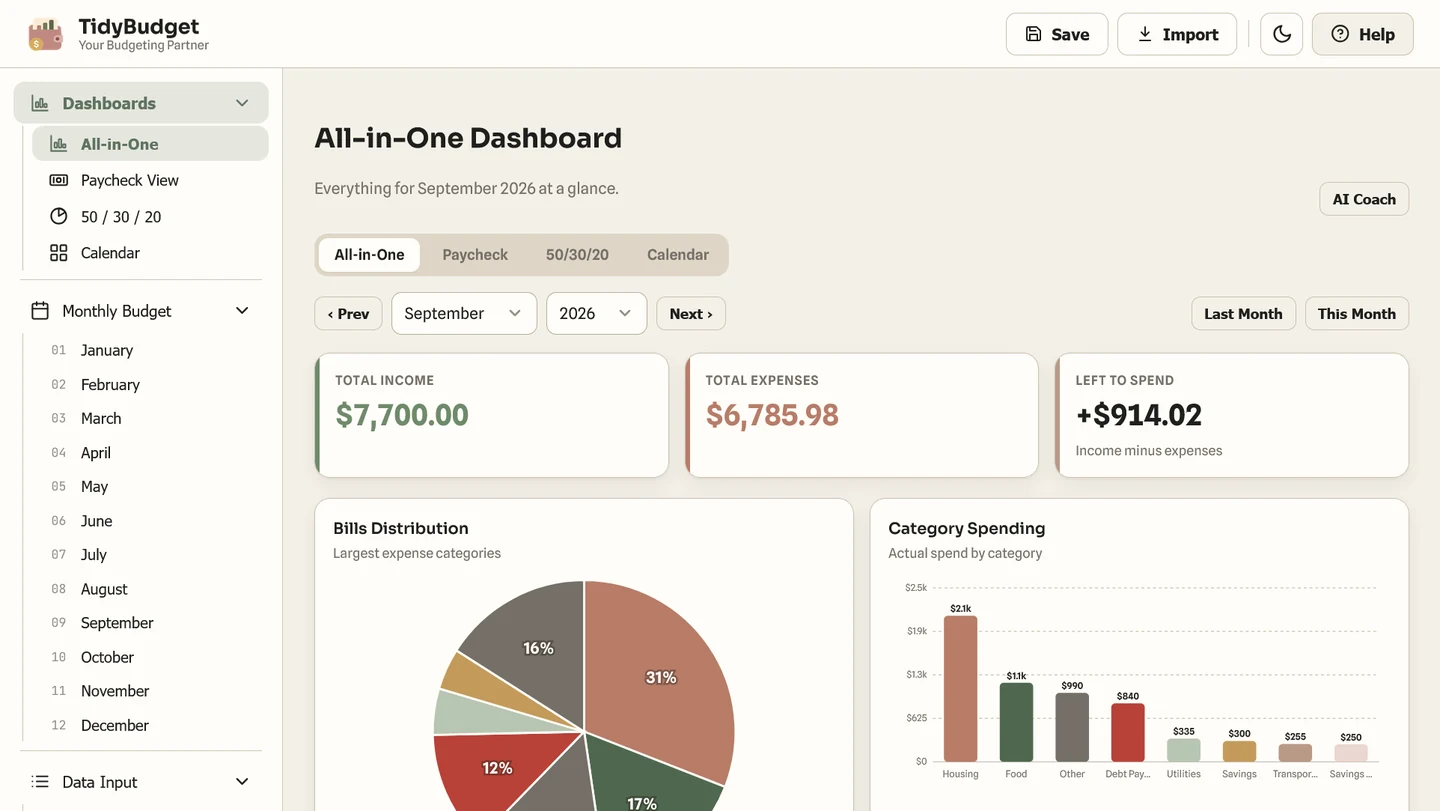
This is what greets you when you open the file — income, expenses, and what's left to spend, plus a bills-distribution pie chart and a category spending bar chart. It's the ten-second version of "am I okay this month," with your household totals together on one screen.
TidyBudget budget screen
02 · Set it once

The monthly budget tracker

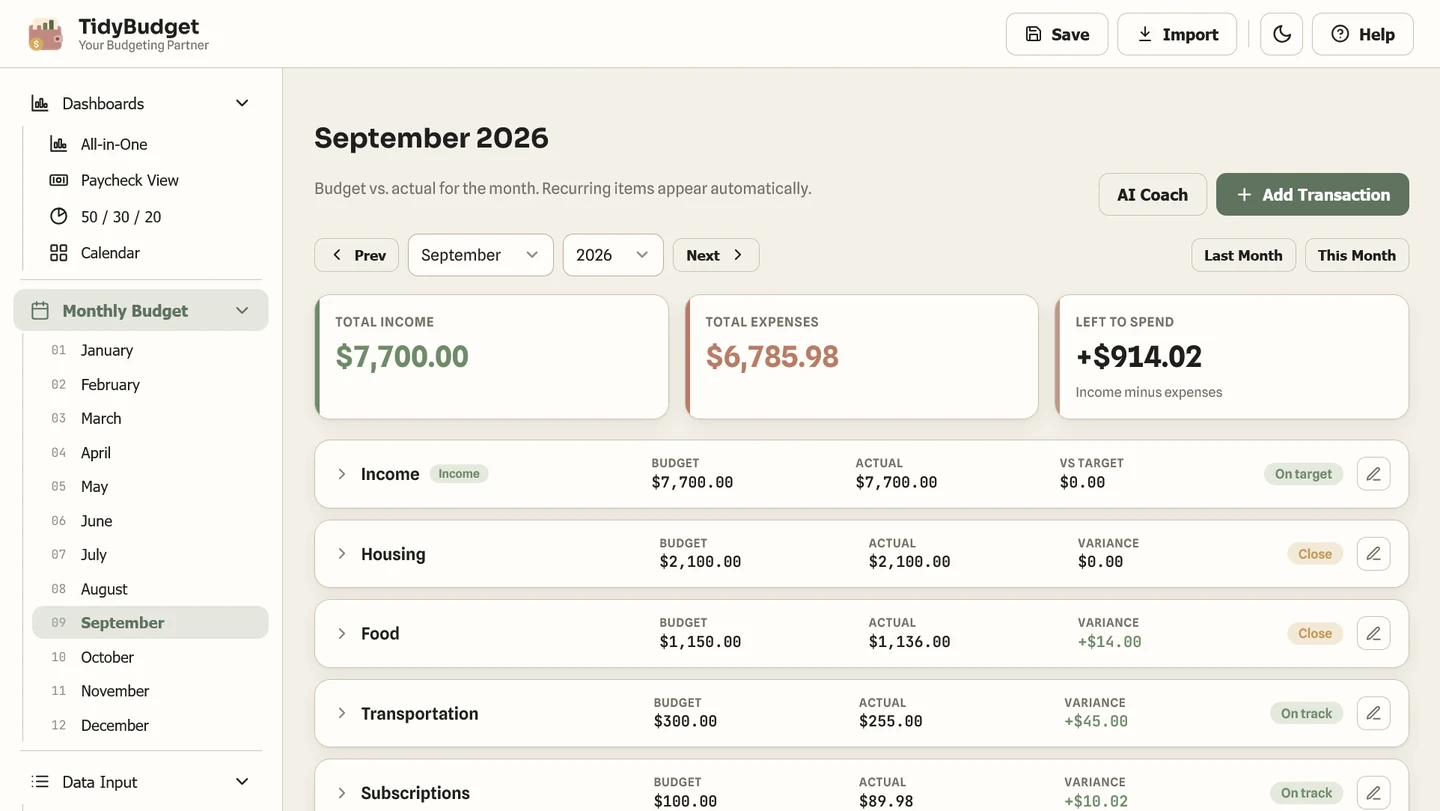
Set a dollar limit per category once, then just log transactions as they happen — the budget-vs-actual columns fill themselves in. The "No budget" label means it doesn't nag you to cap every single category, only tracks the ones you actually bother to set.
TidyBudget paycheck screen
03 · The question a spreadsheet never quite answers

Paycheck View

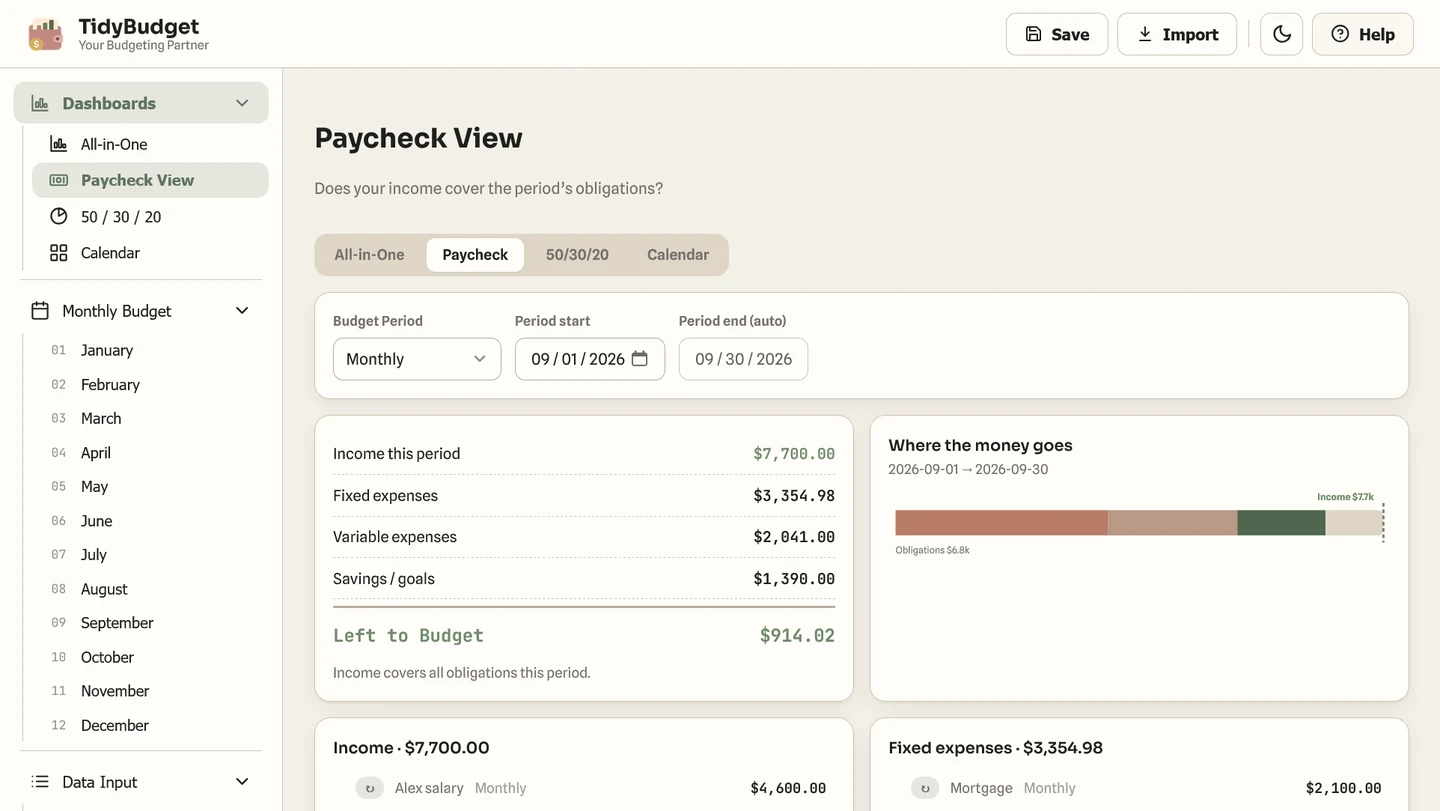
This screen answers "will this paycheck cover the bills" directly, instead of making you do the mental math. Switch between weekly, bi-weekly, semi-monthly, or a custom period and everything — income, fixed expenses, variable spending, what's left — recalculates instantly.
TidyBudget calendar screen
04 · No more surprise due dates

Bill Calendar

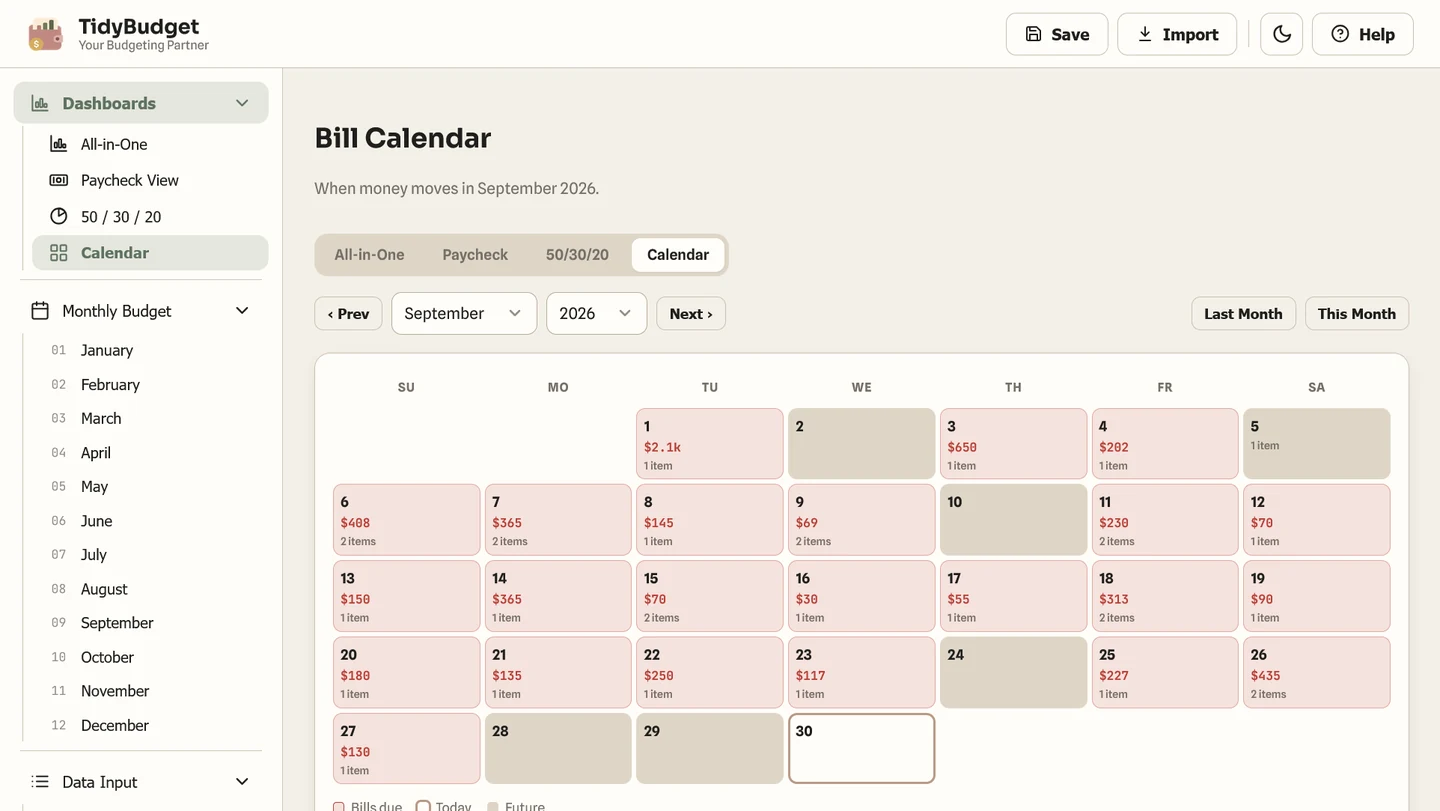
Every recurring bill you've entered once shows up on its due date automatically — you're not re-typing rent every month. Tap a day to see exactly what's due, and there's a weekly out-flow total underneath so nothing ambushes you three days before payday.
TidyBudget allocation screen
05 · If you like a framework

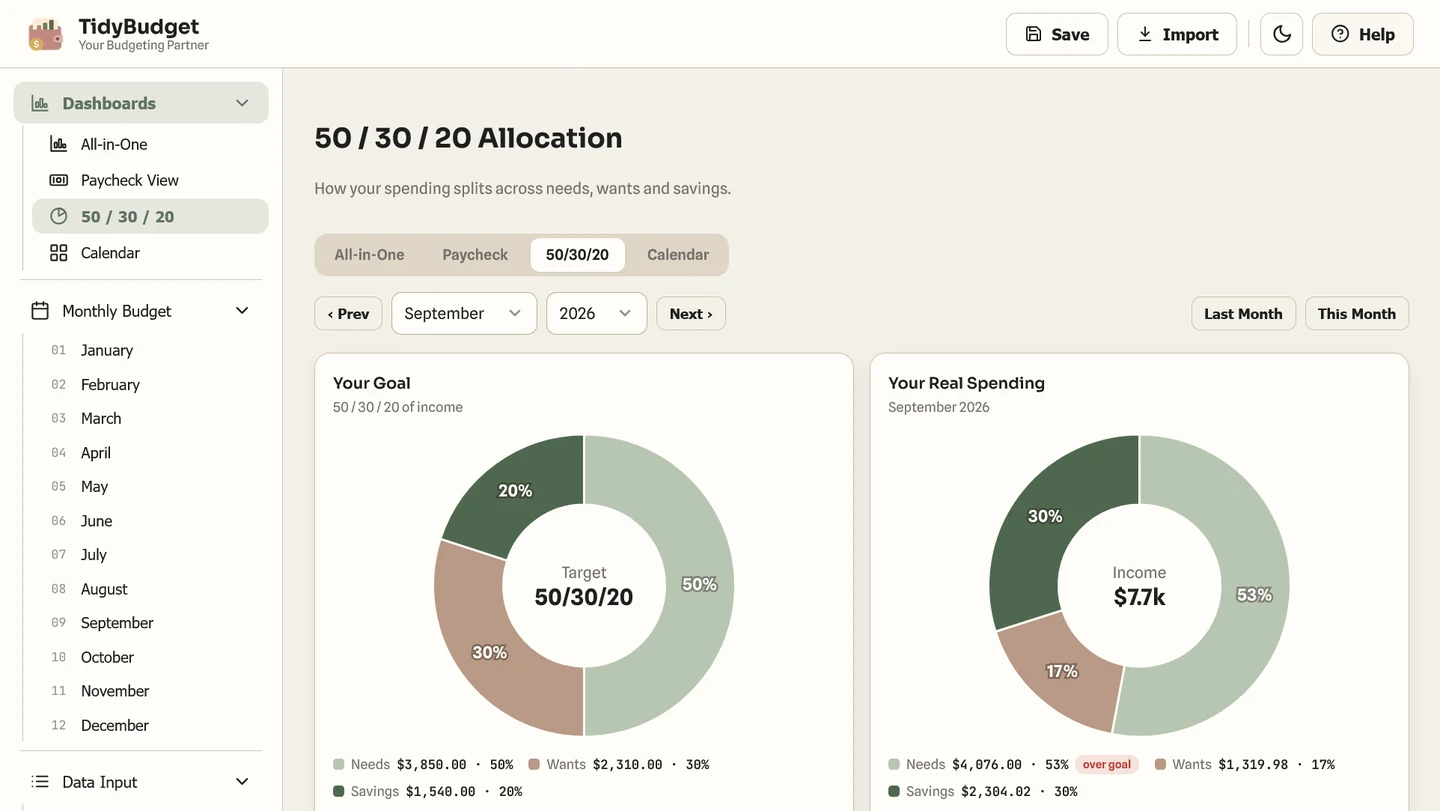
The 50/30/20 dashboard

If the classic needs/wants/savings split is your thing, this compares your target ratio against what you actually spent, category by category. It's not locked to the textbook 50/30/20 either — you can set 70/20/10 or whatever actually fits your household.
TidyBudget annual summary screen
06 · The zoomed-out view

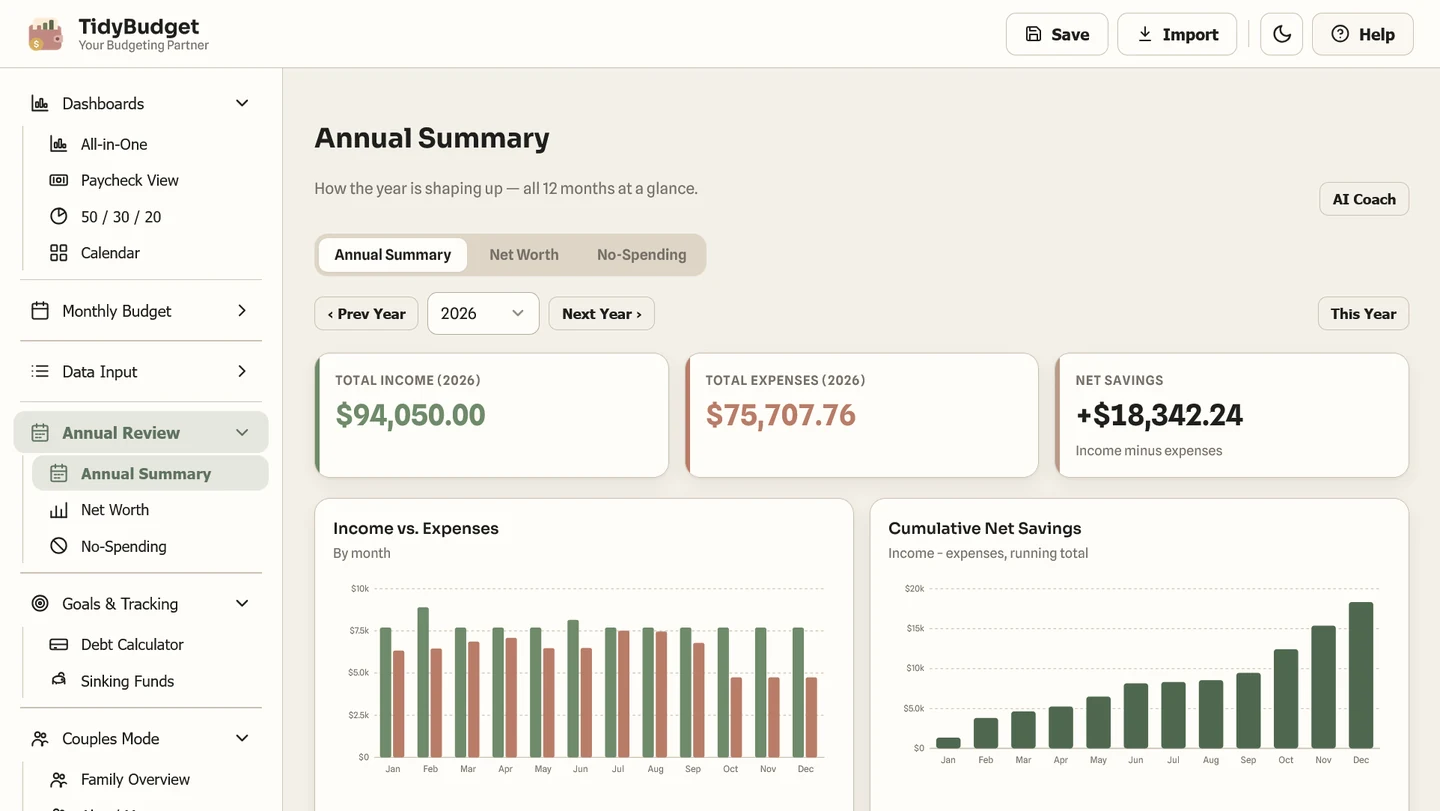
Annual Review

Twelve months of income vs. expenses, plus a running savings total, on one screen. It's the tab that turns a whole year of data into a five-second scan instead of scrolling back through twelve separate monthly views — and it exports to CSV if you want to dig further.
TidyBudget debt calculator screen
07 · The debt math nobody wants to do by hand

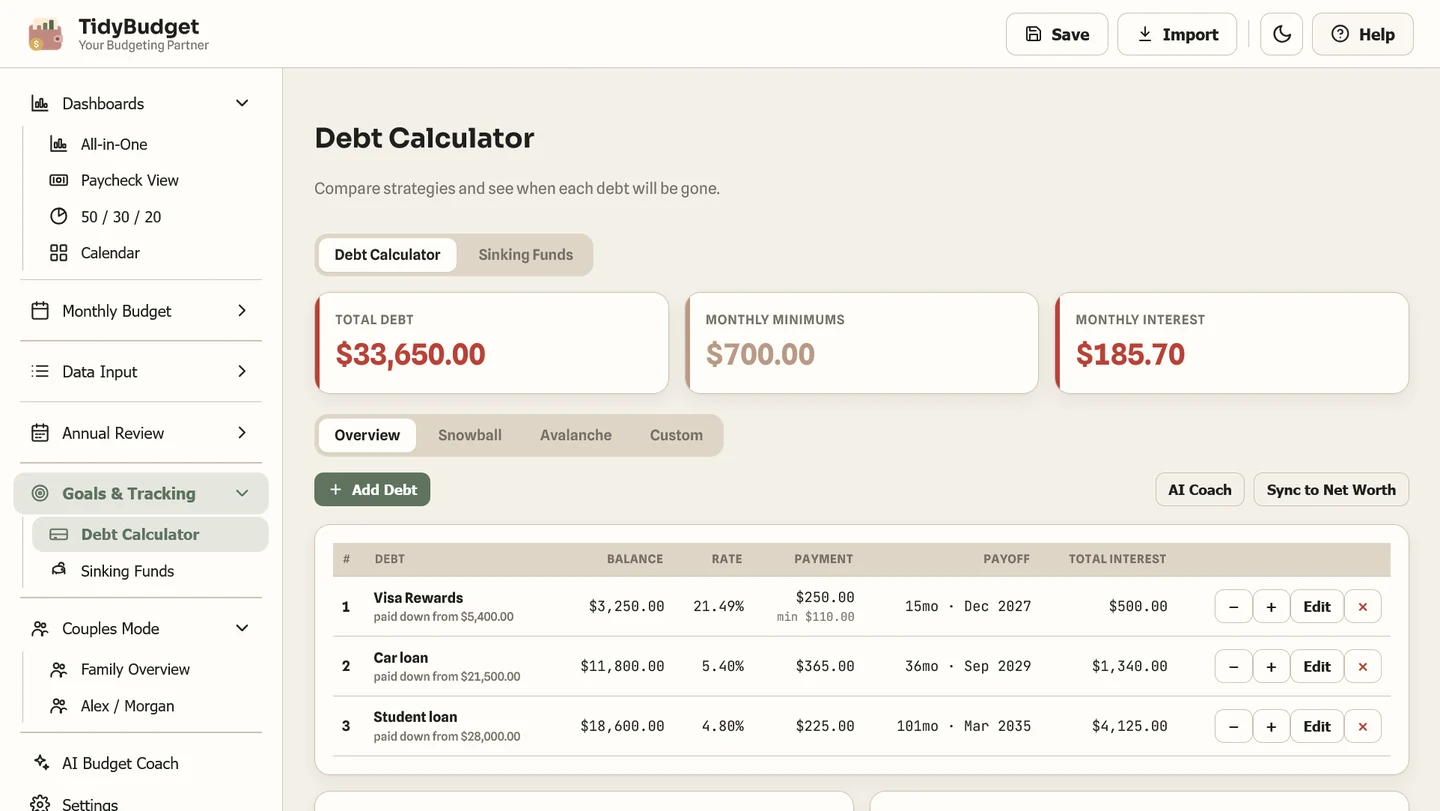
Debt payoff & sinking funds

Three payoff strategies — snowball, avalanche, or your own custom order — each with an exact payoff date and total interest, not a vague "you'll get there eventually." Sinking funds for savings goals live on the same tab, so they're not a bolted-on afterthought.
TidyBudget net worth screen
08 · The number that actually matters long-term

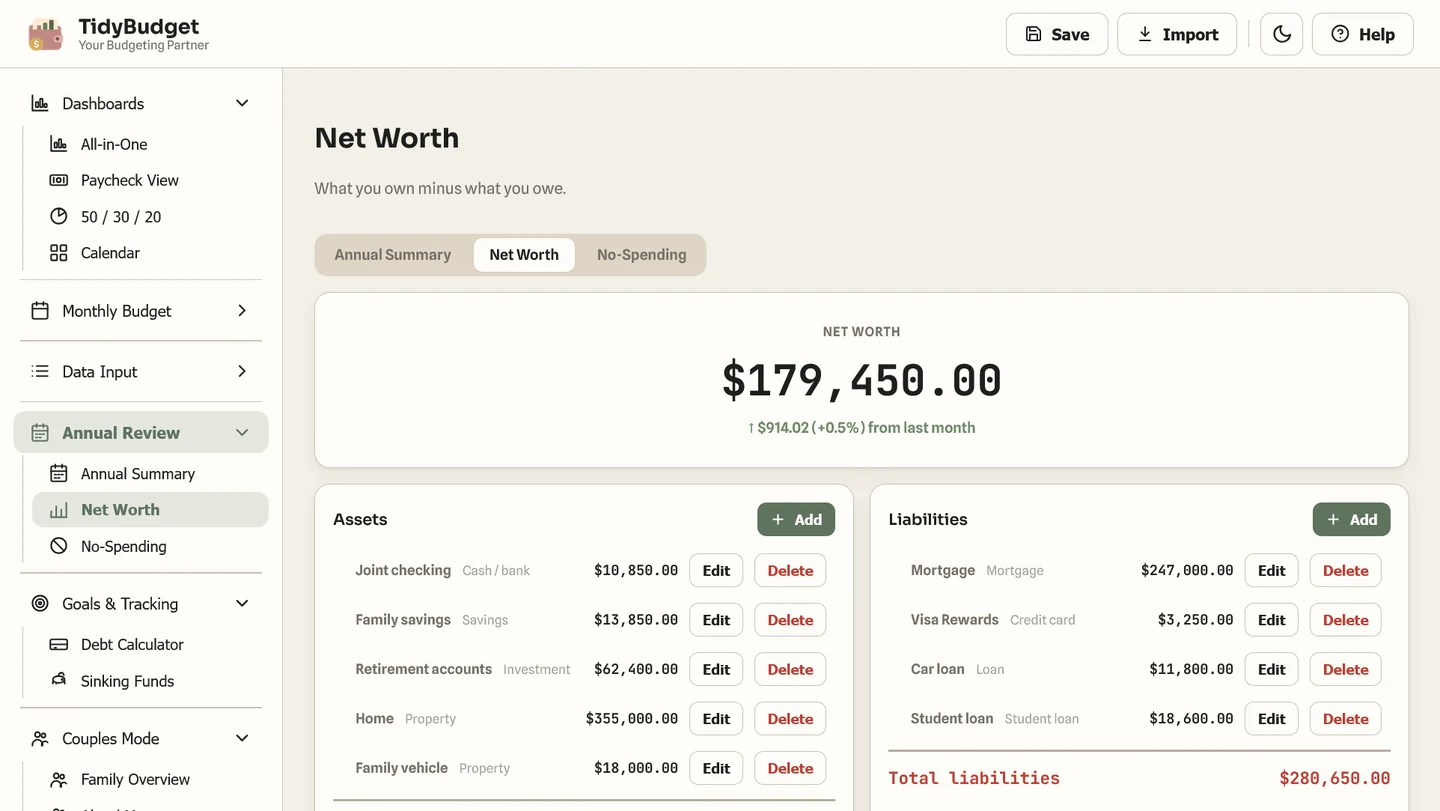
Net worth & no-spend tracking

Assets minus liabilities, with the month-over-month change shown right at the top — organize checking, savings, investments, and property on one side, mortgage and loans on the other. The no-spend challenge underneath is a small thing, but it turns "try not to spend today" into something closer to a game than a guilt trip.
TidyBudget family screen
09 · For two-income households

Couples Mode

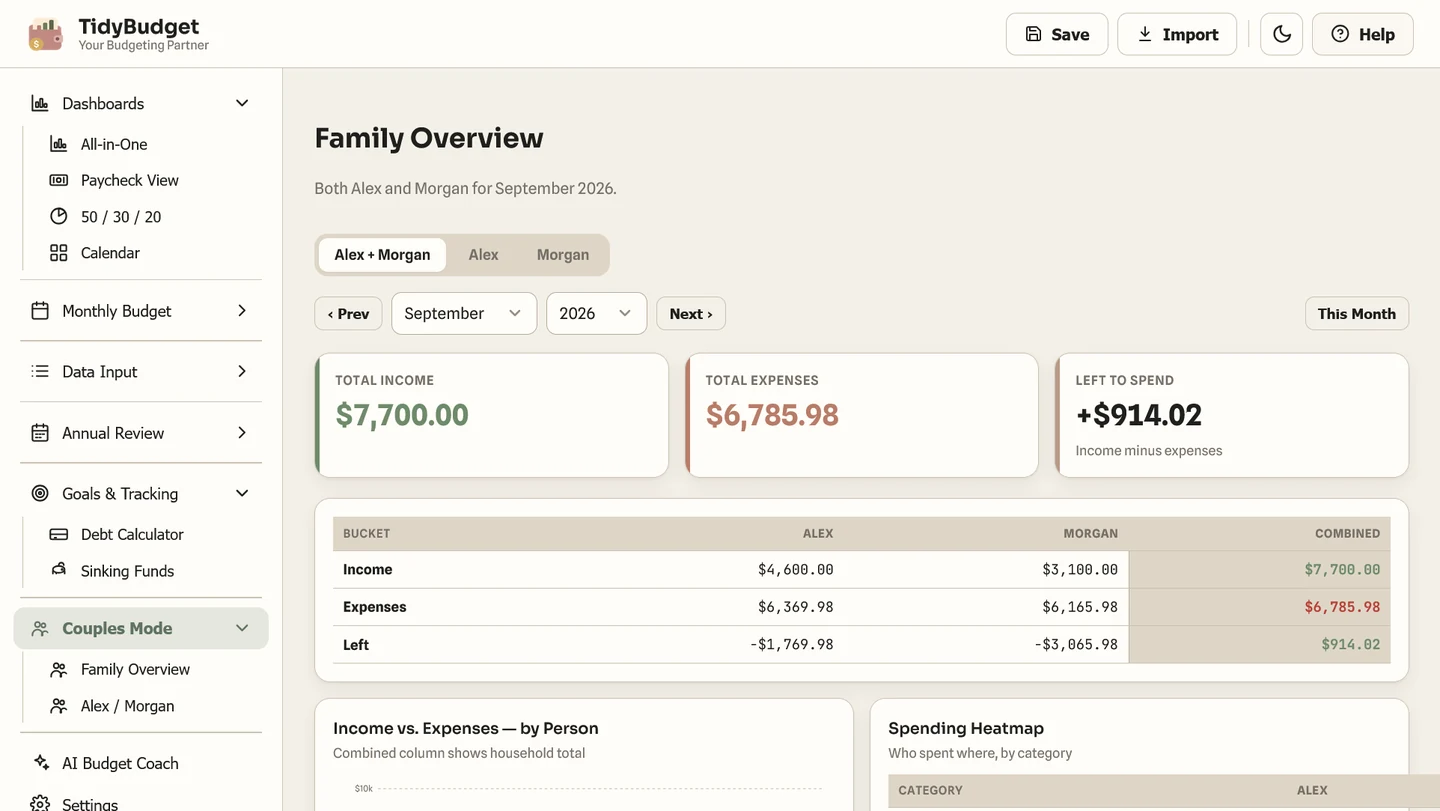
Turn it on and every transaction gets tagged to a person, and marked shared or personal. You can view the combined household total or flip to just one person's numbers — genuinely useful if one of you tracks the bills and the other doesn't want to dig through a shared spreadsheet to find out where the money actually went.
TidyBudget recurring screen
10 · Entering data without it becoming a chore

Recurring & variable transactions

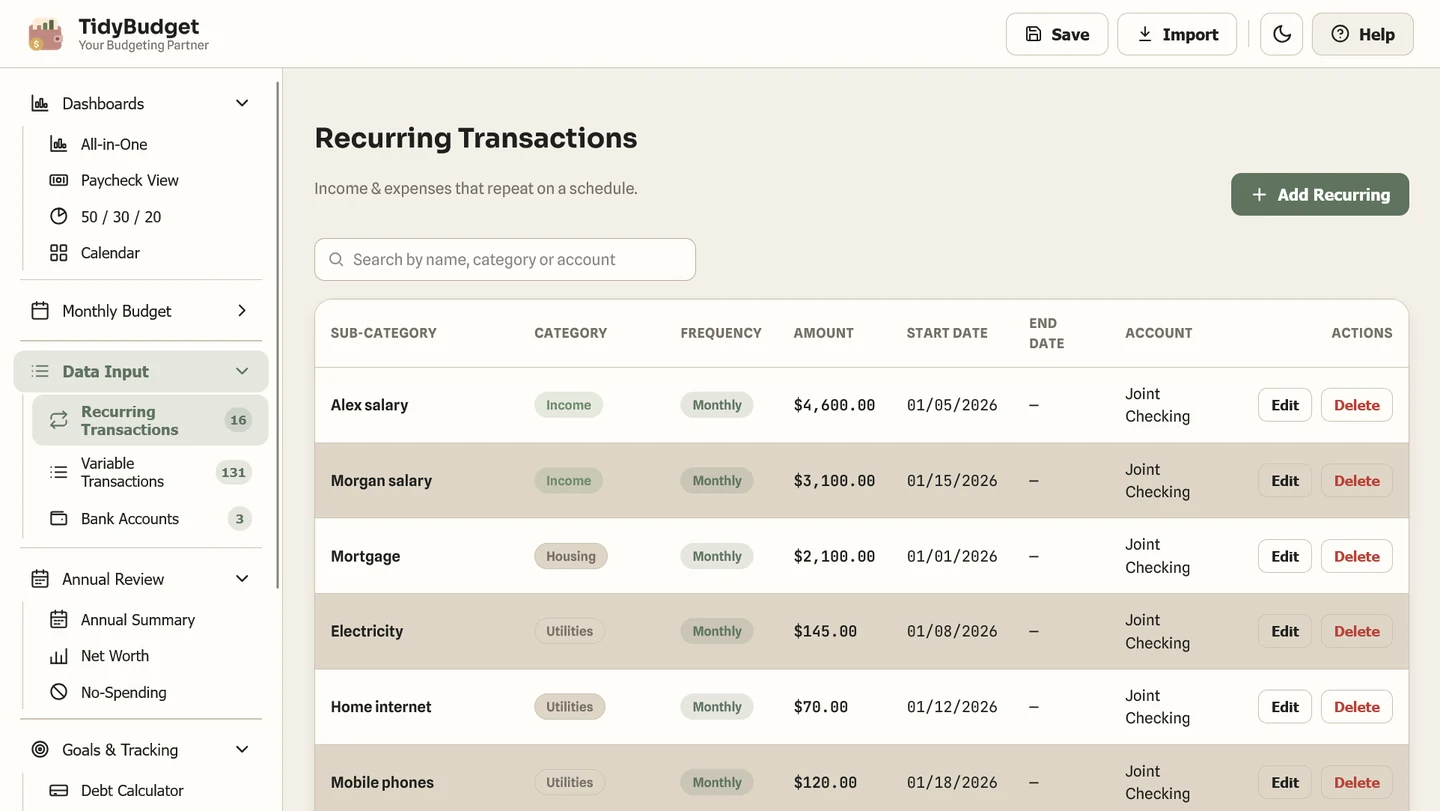
Rent, subscriptions, anything that repeats — enter it once and it just shows up every month going forward. Day-to-day spending goes into a separate, searchable list, so you're not scrolling past eleven months of grocery runs to find one rent payment from March.
TidyBudget settings screen
11 · The small stuff that adds up

Make it yours

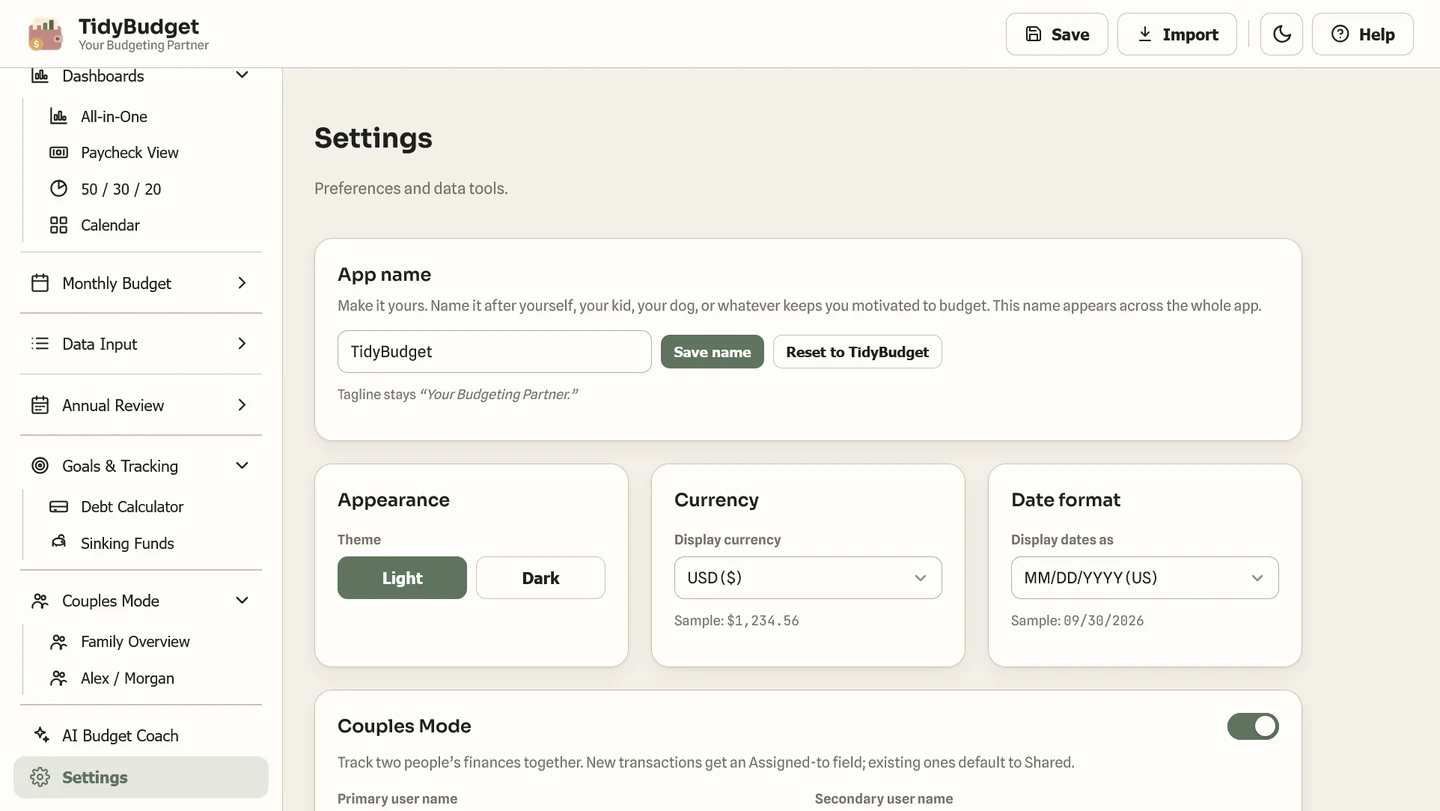
Rename the app to whatever keeps you motivated, switch between light and dark, pick your currency. None of these are headline features, but they're the kind of detail that tells you it was actually finished, not just shipped. And there's no "sign in to continue" screen anywhere — because there's no account to sign into.

Already tried the free Money Leak Score? Here's how they're different.

Think of the Money Leak Score as a flashlight — you point it at your spending once, and it shows you where the leaks are right now. TidyBudget is what you run every month after that, so the leaks stay found: the budget, the bills, the debt payoff, the savings goals, all in the same place, updating as you go. One's a diagnosis. The other is the ongoing system.

Who this is actually right for

We'd rather you find this out here than after you've paid for it.

Probably a good fit if —

  • You don't want your bank connected to a third-party app, ever.
  • You'd rather pay once than rent software forever.
  • You and a partner both want visibility into shared money.
  • You want debt payoff dates and net worth in the same file as your budget.
  • You're fine typing in your own numbers in exchange for full privacy.

Probably not, if —

  • You want transactions to import automatically from your bank.
  • You want a native phone app from an app store, not a browser file.
  • You need multi-currency accounts tracked simultaneously.
  • You only want a free tool — TidyBudget is a one-time paid app.
  • You'd rather not type anything in manually, ever.

TidyBudget

"What's my whole financial picture?" Accounts, income, debt payoff, net worth, and bills, together. You're looking at it.

TidyExpenses

Just want the bills handled — due, paid, owed, overdue — without the full dashboard? That's the lighter option.

Read our honest look at TidyExpenses →

TidyEnvelopes

Think in "what's left in Groceries," not account balances? That's the cash-envelope method, digitized.

Read our honest look at TidyEnvelopes →

Budget Plan Agent

Don't want an ongoing app at all? Answer questions in a chat once, get a finished plan — no tracking required afterward.

Read our honest look at Budget Plan Agent →

Questions worth asking before you buy

Do I need an account?
No. You download the file, open it, and it works. Nothing to sign up for.
Is it actually a one-time payment?
Yes — pay once through the Applings Studio store, use it for as long as you want. No recurring charge.
Will it connect to my bank?
No, and that's on purpose. You stay in control and your numbers stay private — you enter what you want to track.
Does it really work offline?
Yes. Once you have the file, no internet connection is required to use it.
Where does my data actually live?
On your device, inside the file itself. You can back it up manually and move it between devices whenever you like.
Can my partner use it too?
Yes — Couples Mode is built in for two people, shared or separate spending.
Is it a hassle to set up?
If you can fill in a form, you can set it up. A quick-start guide is included with the download.
What if it's not for me after all?
We won't misstate a policy here — check the current refund terms on the store page before you buy, so you know exactly where you stand.
What's actually included

Everything above, in one file.

  • The full TidyBudget app — one file, yours to keep
  • Every dashboard shown above: all-in-one, paycheck, calendar, 50/30/20, annual
  • Debt payoff (snowball / avalanche / custom) + sinking funds
  • Net worth tracker, no-spend challenge & Couples Mode
  • Works offline · any currency · light & dark · rename it
  • Quick-start guide included
$69 $47 · one-time purchase

One payment. No TidyCents subscription. Purchase through Applings Studio.

See TidyBudget on Applings Studio →

Not sure yet? That's fair.

You don't have to decide anything by reading a web page. If you want to see whether this whole approach — no bank login, one-time payment, everything private — even suits you before spending anything, start with the free tool instead.

Get TidyBudget →
Sold and fulfilled by Applings Studio, our own studio brand

Full disclosure: TidyBudget is our own product, sold through Applings Studio. This page explains its features, costs, and limitations to help you decide whether it fits your household. Product previews are illustrations, not evidence of a customer result.