TidyCents. Budgeting that finally makes sense.
A closer look · Budget Plan Agent

Talk through your money. Build a monthly plan you can use.

Start with your income, bills, and the part of budgeting that keeps tripping you up. Budget Plan Agent guides the conversation toward a monthly plan, irregular-expense funds, and a weekly spending number. The previews below illustrate the workflow; they are not a customer case study or a complete recorded conversation.

Why a blank template feels worse than doing nothing

A budget template doesn't ask you anything. It just sits there with forty empty cells, and every one of them is a decision nobody's made yet: which categories, how many, is $350 realistic for groceries this month, does car registration get its own line or vanish into "miscellaneous." None of that is a spending problem. It's a decision problem, and it's the actual reason so many templates get filled in once and never opened again.

Budget Plan Agent's whole premise is that the questions should come from the tool, not from you staring at an empty grid.

What it actually is (and isn't)

Budget Plan Agent is a reusable AI budgeting skill. Add the supplied skill files to a supported ChatGPT or Claude setup, then use the guided conversation to work through your household numbers. Platform access is separate. Check the resulting calculations and assumptions before using the plan.

From a rough picture to a usable plan

These four previews introduce the main stages. Your figures, questions, and results will depend on your situation and the AI platform you use.
Budget Plan Agent budgeting workflow preview
Start with your numbers

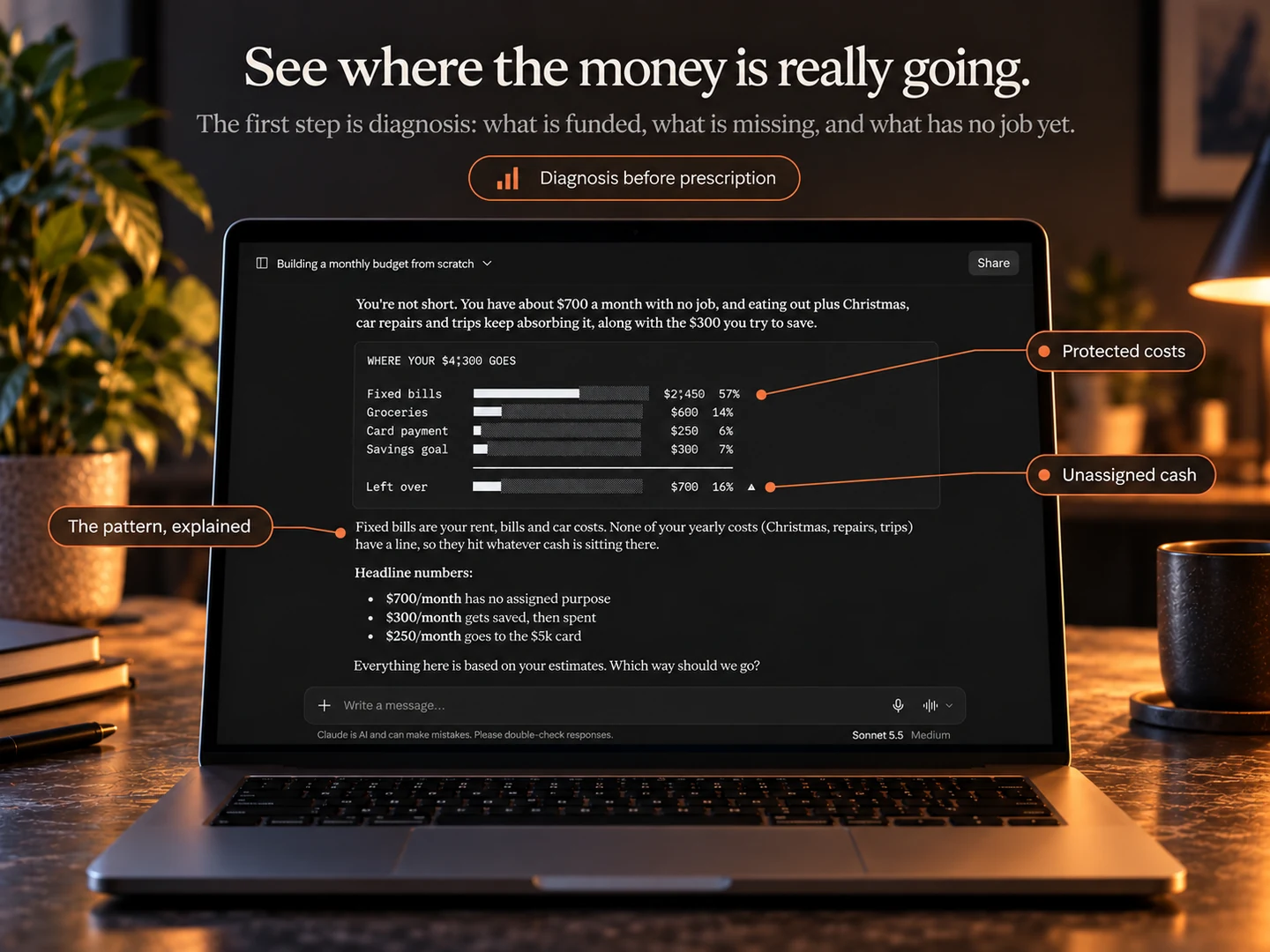
A diagnosis before it's asked much else

Bring your take-home income, regular bills, everyday spending, debt minimums, and savings goals. The workflow starts by organizing those figures and looking for gaps, including irregular costs that are easy to leave out.
Budget Plan Agent budgeting workflow preview
Build the monthly picture

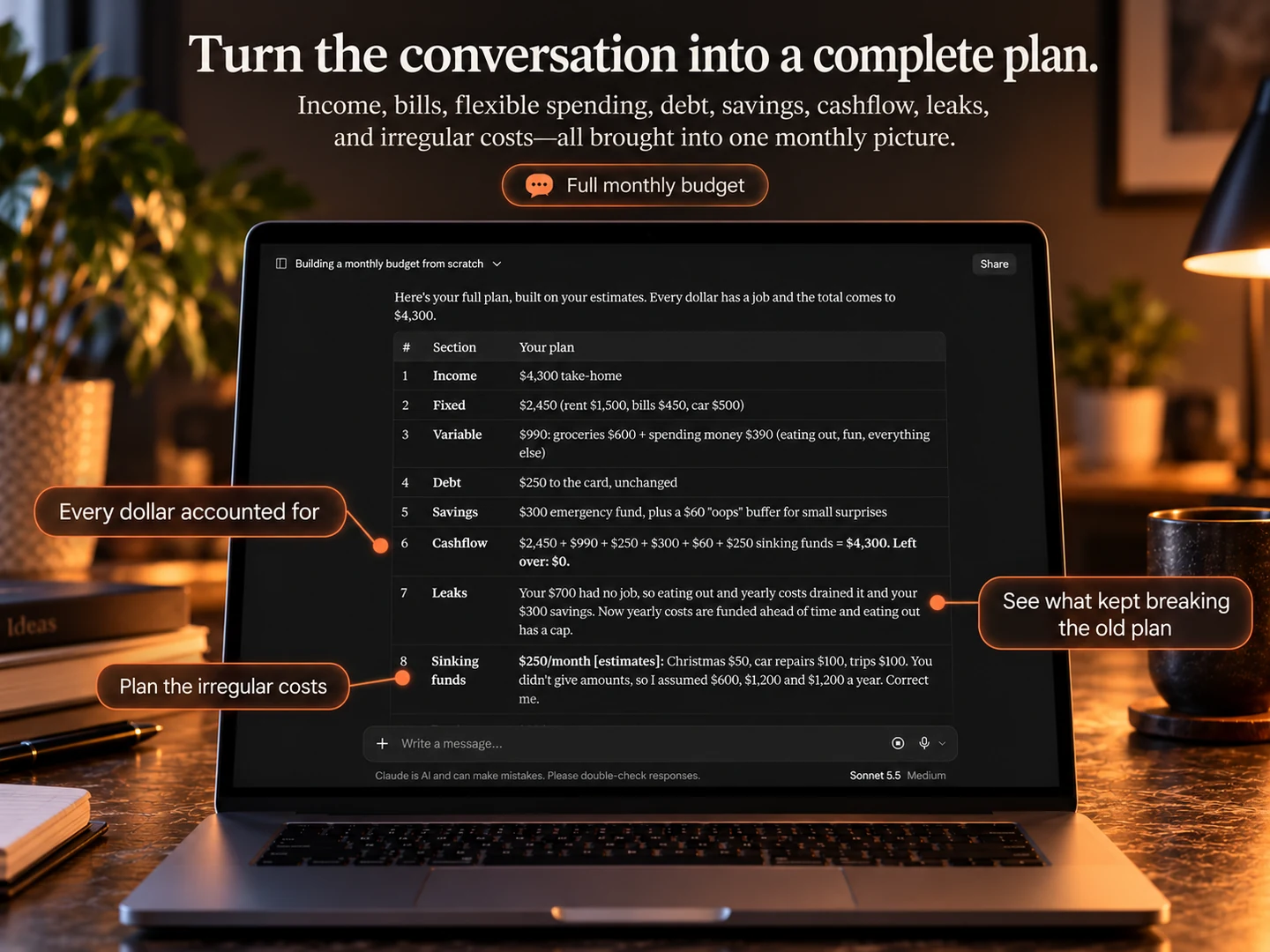
The actual cause, not the symptom

Annual expenses still need a place in a monthly budget. The skill is designed to convert those costs into monthly amounts and show how they fit alongside bills, debt payments, savings, and everyday spending.
Budget Plan Agent budgeting workflow preview
Choose your adjustments

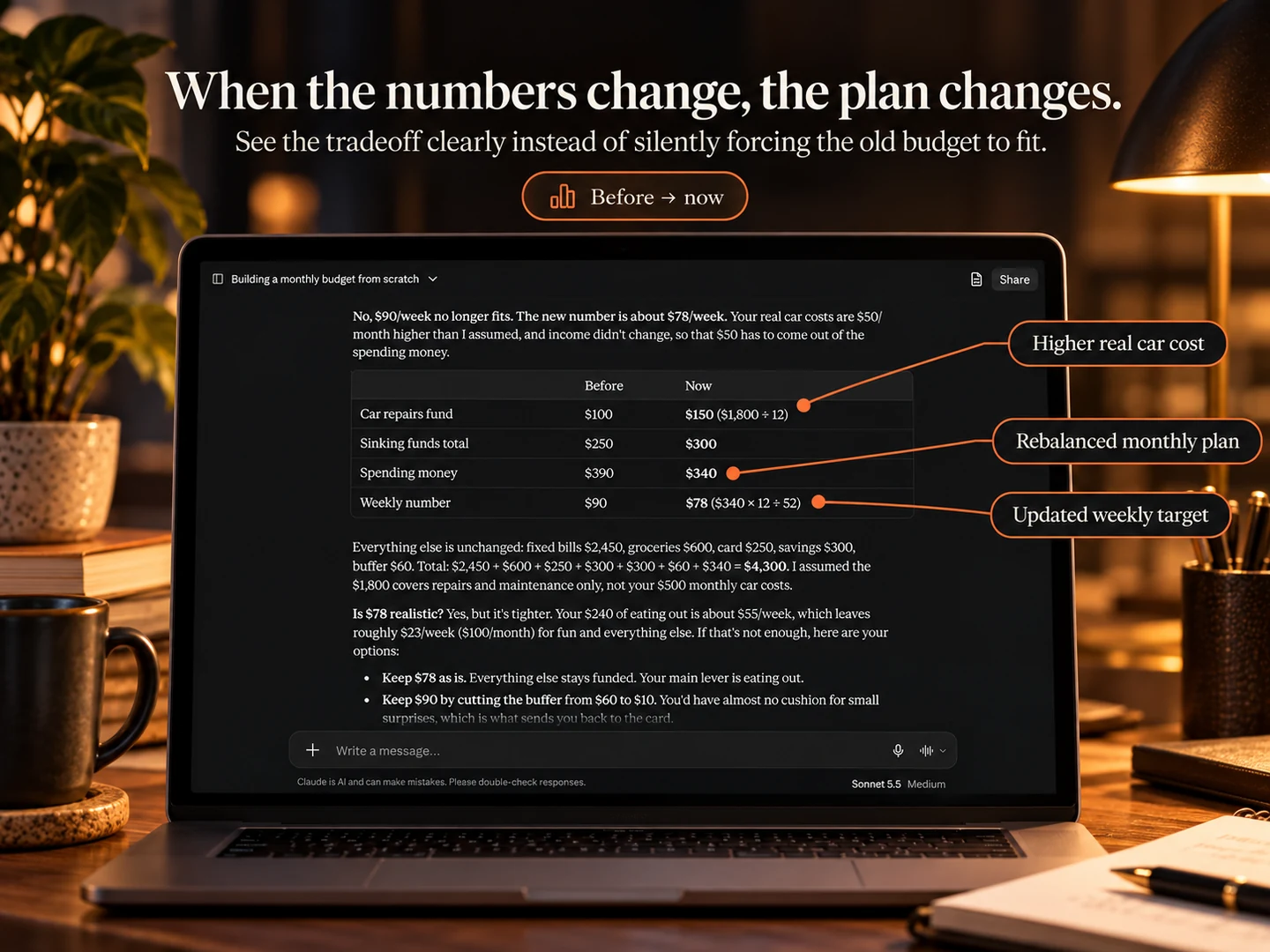
Specific numbers, not a lecture

Explore adjustments that fit your household: change a savings target, make room for an irregular expense, or set a weekly spending limit. The aim is a plan you can explain and review, with estimates clearly identified.
Budget Plan Agent budgeting workflow preview
Keep the next steps

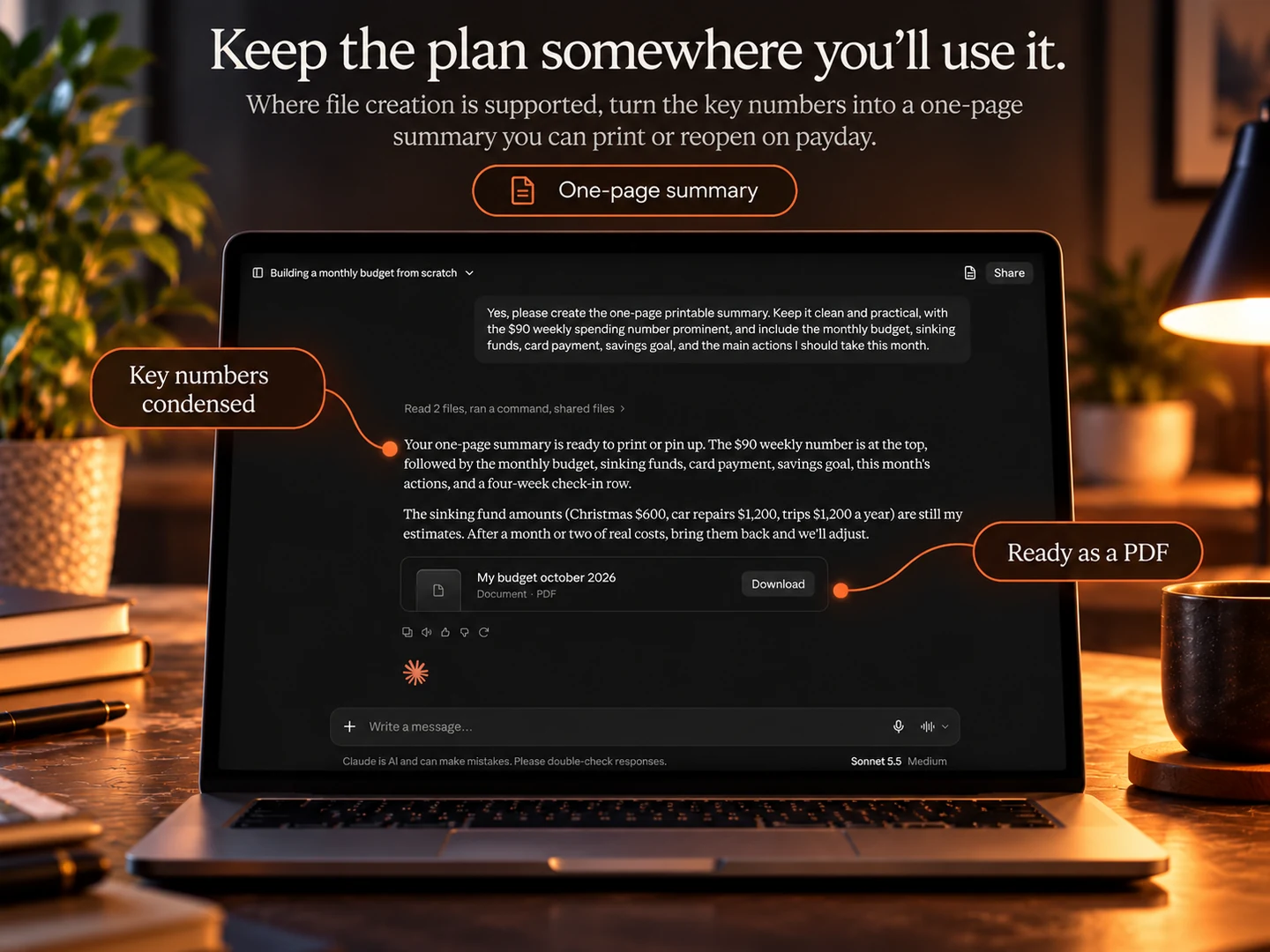
A plan you can actually keep

Turn the plan into actions for the next payday and the next 30 days. Keep a copy of the monthly summary and weekly spending number. Bring it back when your income, bills, or priorities change.

Three rules baked into the file

It goes quiet when you're underwater

No product mentions, no upsells, if the plan closes negative. Silence is the default, not an exception.

It won't ask for account numbers

No bank login, no card numbers, no passwords, ever. You type categories and rough amounts, nothing else.

It won't gut your grocery budget

No discretionary category gets cut by more than 30% to close a gap. Real tradeoffs get handed to you.

Not a marketing line — a rule in the file

The skill instructions prioritize essential expenses and a workable plan. They direct the AI to avoid product suggestions when the budget is in deficit and to offer practical next steps when money is tight. AI output can still make mistakes, so review the advice and numbers.

Blank template, generic AI chat, or this

The honest comparison isn't against a spreadsheet here — it's against the two things people actually reach for first.

 Blank templateGeneric AI chatBudget Plan Agent
Getting started Forty questions to answer before you've placed a single dollar, no guidance on what's realistic. Dumps a rough budget in one long reply, without asking what's actually going on first. A short first reply — diagnosis, chart, three paths — then it stops and asks.
Irregular income One line for "income," averaged, with no room for a slow month. Averages your income too, unless you think to ask it not to. Budgets your worst month by default, plus a tax set-aside most people forget.
Closing a shortfall No opinion at all — you're on your own to decide what to cut. Will happily suggest cutting half your discretionary spending. Capped at 30% per category, and hands you the real tradeoff instead.
When you're underwater Doesn't know, and wouldn't say anything if it did. May still suggest products, subscriptions, or generic "see a professional" boilerplate. Goes quiet — no mentions, no boilerplate — until the numbers actually allow it.

The one trade-off worth knowing before you buy

Every other tool on this site is a file that runs entirely on your device, offline, with nothing ever transmitted anywhere. This one is different, and we'd rather say so plainly than let the similar branding imply otherwise:

  • You receive access to the Budget Plan Agent skill package for a supported ChatGPT or Claude setup. Platform access is separate.
  • Because of that, it's the only TidyCents tool that isn't offline. The numbers you type go into a conversation with OpenAI or Anthropic's servers, and how that's handled follows their privacy policies, not ours.
  • The skill instructions tell the AI not to request account numbers, card numbers, or passwords. Keep those details out of the conversation.
  • It's also not perfectly repeatable. Run the same numbers through twice and you may get slightly different phrasing or emphasis — check the calculations yourself; the wording and results can vary, because that's how language models work.

Four ways to budget with TidyCents

This one builds the plan. The other three are what you'd use to keep tracking it afterward.

Budget Plan Agent

One guided conversation, a finished plan, no ongoing app required. You're looking at it.

TidyEnvelopes

Spend-by-envelope, the classic cash method. For people who think in "what's left in Groceries."

Read our honest look at TidyEnvelopes →

TidyExpenses

Just the bills — due, paid, owed, overdue. The lightest lift of the tracking tools.

Read our honest look at TidyExpenses →

TidyBudget

The whole financial picture — accounts, income, debt payoff, net worth, and bills, together.

Read our honest look at TidyBudget →

Reach for this, or skip it

We'd rather you work this out here than after you've paid for it.

Reach for this if —

  • You want a finished budget today, not a template to fill in over a week.
  • You're comfortable typing rough numbers into a chat conversation.
  • Irregular or self-employed income makes generic budget advice useless to you.
  • You'd rather answer questions than build spreadsheet formulas.
  • You don't want another app to open every month.

Skip this if —

  • You want ongoing tracking, rather than help building and revising a plan (see the three apps above).
  • You don't want any of your numbers touched by a third-party AI service, even without bank details.
  • You need the exact wording to be identical on every run.
  • Free is a hard requirement.

Straight answers to the obvious questions

Is this a subscription?
No — $17 once, and it's yours. Nothing renews, nothing to cancel.
Do I need ChatGPT Plus or Claude Pro?
Check that your ChatGPT or Claude setup supports the skill before buying. Accounts, plan eligibility, and usage limits are set by the platform and are not included in the purchase.
Will it recommend other TidyCents tools?
Only if your plan closes positive and something genuinely fits. If you're short, it stays quiet — that's a rule inside the file, not a sales tactic.
I don't know my exact numbers.
Say so. It builds the plan from rough estimates, flags each one, and tells you which one or two are worth going and checking properly.
Is this financial advice?
No, and it says so itself. It's educational budgeting support — organizing your numbers and showing the math. If your situation needs a professional, it says that instead of guessing.
I'm not in the US.
It works in your own currency throughout — no dollar signs, no 401(k), no American assumptions baked in.
What if it's not for me?
Read Applings Studio's refund policy before buying. The purchase terms are set by the shop.
What you actually get

One purchase, both formats.

  • A reusable skill for supported ChatGPT setups
  • Support for compatible Claude setups; printable files where supported
  • A user guide covering both formats
  • Yours to reuse every month, forever
  • Third-party platform access is separate
  • Refund terms: see the Applings Studio policy before purchase
$39 $17 · one-time purchase

One payment. No TidyCents subscription. Purchase through Applings Studio.

See Budget Plan Agent on Applings Studio →

Still deciding? Fair enough.

Nothing here needs settling by reading a web page. If you want to see whether the underlying idea — a diagnosis before a plan, a cap on how much gets cut — actually suits you before spending anything, the free tool is a smaller first step.

Get Budget Plan Agent →
Sold and fulfilled by Applings Studio, our own studio brand

Full disclosure: Budget Plan Agent is our own product, sold through Applings Studio. This page explains its features, costs, and limitations to help you decide whether it fits your household. Product previews are illustrations, not evidence of a customer result.